If you notice that ViVA Reviews is importing fewer reviews than expected, the issue usually comes down to one of two things. Either the product supplier does not have enough reviews available, or the import settings are limiting how many reviews can be pulled.
Follow the steps below to resolve the issue.
1. Check the Supplier’s Order Volume
The most common reason for low review imports is that the supplier simply does not have many reviews available.
ViVA Reviews pulls reviews from the supplier’s product page. If the supplier has very few orders or reviews, there will not be much content to import.
What you should do
Try switching to a supplier that has more orders and customer feedback.
Recommended approach:
Use the AI Supplier Finder on Sell The Trend to locate alternative suppliers for the same product.
Look for suppliers with higher order counts and more customer reviews.
Replace the current supplier with the stronger option.
If the AI Supplier Finder does not show suitable alternatives, you can also search directly on AliExpress and look for listings with a large number of orders and reviews.
Once you switch to a supplier with more activity, ViVA Reviews will have more content to import.
2. Check Your Review Import Settings
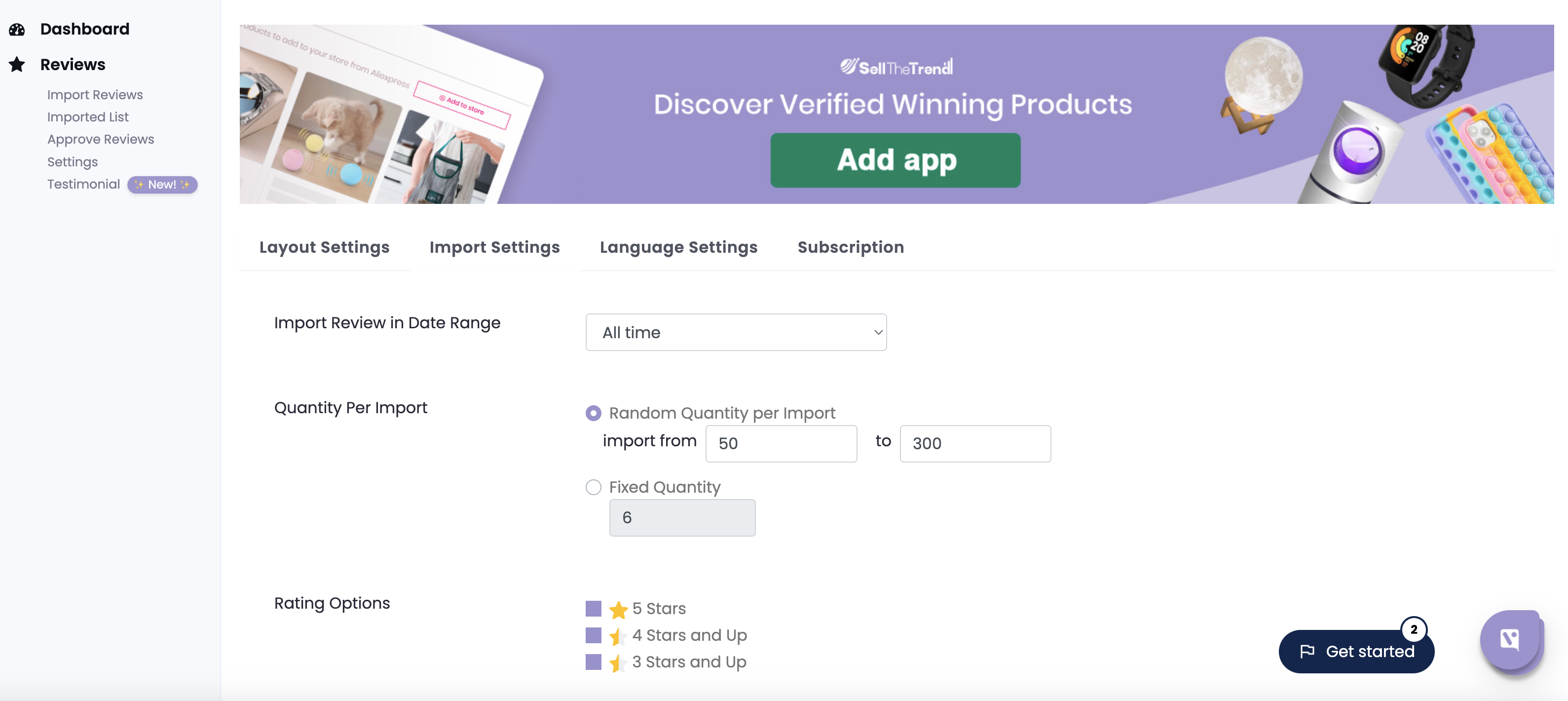
Your import settings may also be limiting the number of reviews that can be pulled.
Open your ViVA Reviews settings and verify the following options.
Import Review in Date Range
Set this to:
All Time
If a shorter date range is selected, many older reviews will be excluded from the import.
Quantity Per Import
Make sure this value is not set too low.
If the quantity is limited to a small number, ViVA Reviews will only import that many reviews each time.
Increasing this value allows more reviews to be imported in a single process.
Rating Options
Set this to:
4 stars and up
This ensures that high quality reviews are imported while still allowing a good volume of feedback.
Photo Options
Select both of the following:
Reviews with Photos
Reviews without Photos
If only photo reviews are selected, the number of available reviews will be much smaller.
Reviewer Location
Make sure All Countries are selected.
This setting is extremely important. If the import is limited to only a few countries, most reviews may be excluded.
Selecting all countries allows ViVA Reviews to import the full set of available reviews.
Summary
If ViVA Reviews is importing too few reviews, check these two areas first.
Make sure your supplier has enough orders and reviews. If not, switch to a better supplier using the AI Supplier Finder or AliExpress search.
Verify that your review import settings are not restricting the results.
Once these settings are optimized and the supplier has enough reviews available, ViVA Reviews should begin importing a much larger number of reviews automatically.
Was this article helpful?
That’s Great!
Thank you for your feedback
Sorry! We couldn't be helpful
Thank you for your feedback
Feedback sent
We appreciate your effort and will try to fix the article