At the moment, SellShop does not include a built-in blogging platform.
However, you can easily create a blog using a free blogging service and then link it from your store’s navigation menu.
This allows you to publish articles, share updates, improve SEO, and provide valuable content for your customers.
Step 1: Choose a Free Blogging Platform
Some popular free blogging platforms include:
Blogger
Benefits:
- Completely free
- Owned by Google
- Easy to set up
- Good for beginners
Medium
Benefits:
- Fast and simple publishing
- Built-in audience
- No technical setup required
WordPress.com
Benefits:
- Most powerful blogging platform
- Professional appearance
- Excellent SEO capabilities
Step 2: Create Your Blog
Sign up for the platform of your choice and create your blog.
Examples:
- yourstoreblog.blogspot.com
- medium.com/@yourstore
- yourstore.wordpress.com
Once your blog is created, publish your first article.
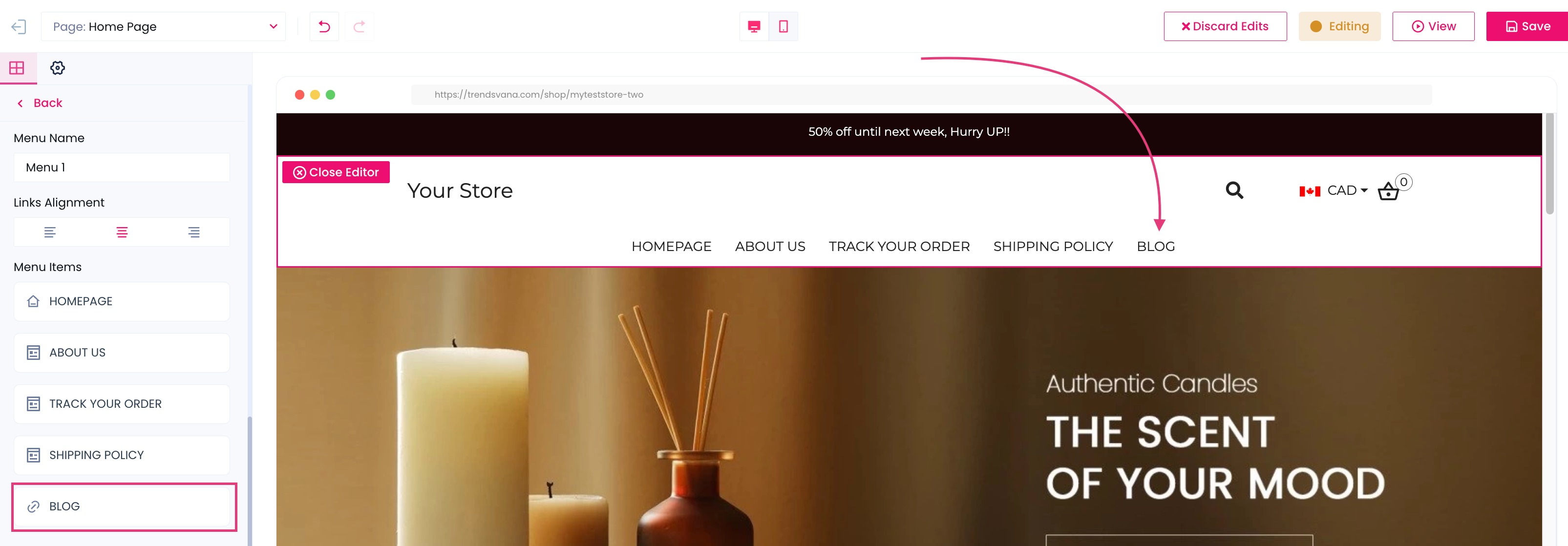
Step 3: Add the Blog Link to Your Store Menu
Inside your SellShop store:
- Go to your website editor or menu settings.
- Locate your main navigation menu.
- Add a new menu item called Blog.
- Paste the URL of your blog.
- Save your changes.
Example:
Blog → https://yourstoreblog.blogspot.com
Why Add a Blog?
A blog can help you:
- Improve search engine visibility (SEO)
- Build trust with customers
- Share product guides and tutorials
- Publish industry news and updates
- Generate additional organic traffic
Recommended Content Ideas
Some article ideas include:
- Product buying guides
- How-to tutorials
- Product comparisons
- Industry trends
- Customer success stories
- Frequently asked questions
Creating helpful content consistently can help attract more visitors and improve your store’s authority over time.
Final Thoughts
While SellShop does not currently include a built-in blogging feature, creating a free blog on Blogger, Medium, or WordPress.com is a quick and effective solution.
Once your blog is created, simply link it from your store’s navigation menu and start publishing content for your audience.
Was this article helpful?
That’s Great!
Thank you for your feedback
Sorry! We couldn't be helpful
Thank you for your feedback
Feedback sent
We appreciate your effort and will try to fix the article